
Blog Post
Waveapps Invoice vs Focused Invoicing: Which Workflow Fits?
Wave's official invoicing page says its invoicing and payment information connect to Wave's accounting feature. Choose Waveapps when that connection fits; choose focused invoicing when billing records should hand off to books kept elsewhere.
Logan Moore
Wave's official invoicing page says its invoicing and payment information connect to Wave's accounting feature. Choose Waveapps when that connection fits; choose focused invoicing when billing records should hand off to books kept elsewhere.
Choose a Waveapps invoice workflow when invoice and payment information should connect to accounting in the same product; choose focused invoicing software when the main job is creating, sending, tracking, and collecting service invoices while books live elsewhere. The better fit depends on who owns the record after the invoice is sent.
This is a workflow comparison, not a claim that one product is universally better. Features, prices, plan requirements, payment eligibility, and processing times can change, so verify current product pages before switching.
What is the main difference between Waveapps invoices and focused invoicing?
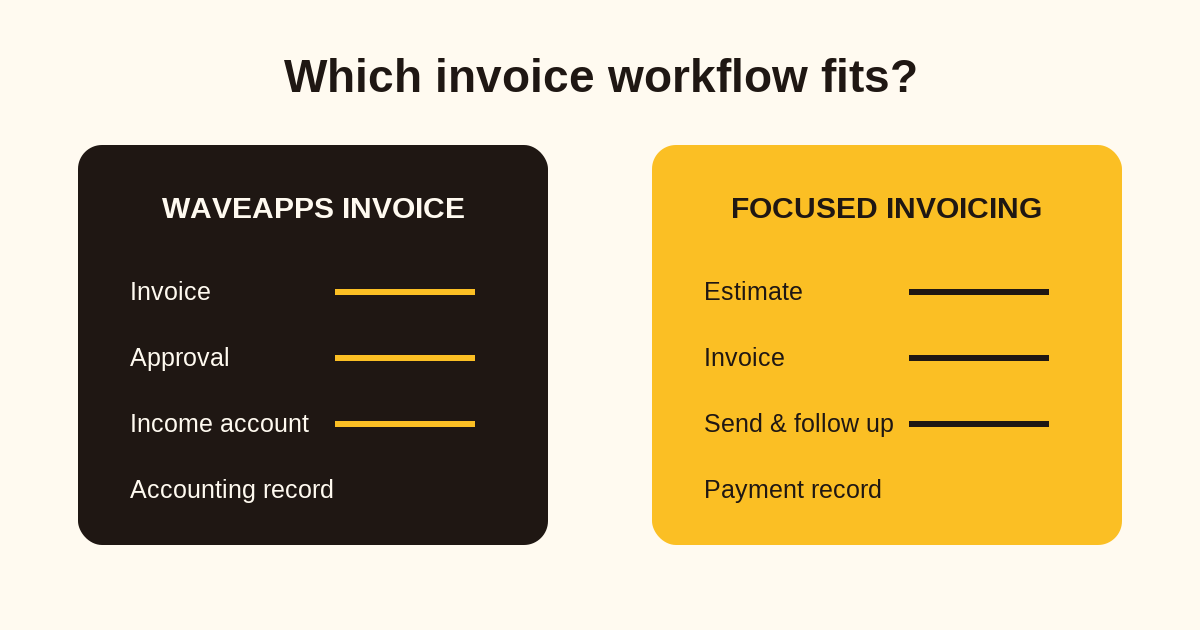
The main difference is the accounting connection. Wave's official invoicing page says: “Your invoicing and payment information are connected to Wave's accounting feature, helping you stay organized.” A focused invoice tool can instead keep the customer document and payment record separate from the accounting system.
That source text establishes a product-level connection. It does not identify the accounting treatment of a particular invoice, prove that a business has configured Wave correctly, or show that every focused invoicing product works the same way.
| Decision | Waveapps invoice | Focused invoicing |
|---|---|---|
| Record handoff | Wave states invoice and payment information connect to accounting | Books can remain in another named system |
| Customer context | Wave describes customer information and communication history in one place | Often centered on billing contacts and documents |
| Automation | Wave describes recurring billing and plan-dependent reminders | Varies by product and plan |
| Best fit | Businesses intentionally using Wave's accounting connection | Service businesses with an established external bookkeeping handoff |
How does customer recordkeeping differ?
Wave says users can access customer information in one place and view payment and communication history. That makes Wave relevant when customer follow-up and the accounting-connected record should stay in the same product.
A focused tool can still maintain customer, invoice, and payment records. The distinction is where those records go next. If a bookkeeper, spreadsheet, or separate accounting product owns the books, define the export or manual handoff instead of assuming the invoice tool completes it.
Which option is easier if you do not need accounting in the invoice tool?
Focused invoicing is often the smaller workflow when another system already owns the books. Staff can concentrate on the customer, description, quantity, rate, delivery, follow-up, and payment record without treating the invoice tool as the general ledger.
That does not make accounting optional. The handoff still needs the invoice number, customer, issue date, payment date, fees, refunds, and any tax data the books require. WaffleInvoice's service-business invoice features show its billing focus; they do not establish that it replaces accounting software.
Which option is stronger when you want accounting connected?
Waveapps is the more direct fit when the business intentionally wants invoicing and payment information connected to Wave's accounting feature. That conclusion follows from Wave's own product statement, not from a claim about a hidden interface or a specific journal entry.
The connection still needs an owner. Someone must verify customer data, line-item math, payment status, and the books. Software integration can reduce a manual handoff; it cannot prove the inputs are correct.
How do free-plan limits compare?
Free-plan limits should be compared by the action repeated each month: records created, emails sent, users added, or payments collected. A “free invoice” label is incomplete without the unit and time window.
WaffleInvoice's product source states: “Free includes unlimited invoice, estimate, and client records plus 25 invoice emails per rolling 30 days. Pro is $19/month or $190/year.” This source walkthrough establishes WaffleInvoice's repository-defined plan boundary; it does not verify Wave's current pricing or promise future terms.
The same tracked source lists Pro at $19 per month or $190 per year. The listed annual price equals ten payments at the listed monthly price: $190 ÷ $19 = 10. This arithmetic compares only the two repository-defined prices; it does not state the length or terms of a subscription, promise future pricing, prove realized savings, or include taxes, refunds, or discounts.
Check the current WaffleInvoice pricing page for complete terms. Check Wave's official pages separately because this comparison does not substitute for Wave's live plans.
How do payment and automation options affect the choice?
Wave's invoicing page describes credit-card, secure bank-payment, and Apple Pay options when online payments are enabled. It also describes recurring billing and automatic reminders with stated plan or payment-feature conditions.
Those statements support testing payment and automation workflows. They do not guarantee eligibility, a processing time, or the same availability in every location. A focused tool should be tested against the same real requirement rather than compared by feature names alone.
Which workflow is better for a service business?
The better workflow is the smallest one that preserves the records the business genuinely needs. Choose Waveapps when the owner or bookkeeper intends to use Wave's accounting connection. Choose focused software when staff mainly estimate, invoice, follow up, and record payment while a named system elsewhere owns the books.
- Pick Waveapps if connected invoicing, payment information, and accounting match the planned recordkeeping workflow.
- Pick focused invoicing if customer billing is the operational bottleneck and the ledger already has an owner.
- Pause the decision if nobody can name the accounting system of record or correction process.
WaffleInvoice was built around invoicing rather than full bookkeeping, as described on the About page. That product scope supports the focused-workflow label. It does not establish that every service business should choose it.
How should you test the two workflows?
Test both workflows with the same fictional job and inspect the records left behind. Do not use real personal or payment data in a trial account.
- Create a customer and invoice with two line items.
- Change one quantity and independently confirm the total.
- Preview the customer copy and delivery options.
- Inspect the payment choices and their current requirements.
- Record a fictional payment status without moving real money.
- Identify the exact record that reaches the accounting system.
The winning tool is the one whose saved record matches the real handoff. A polished invoice matters, but the daily cost usually appears in reconciliation, corrections, follow-up, and retrieval.
Frequently Asked Questions
Quick answers to the questions readers ask most about this topic.
Is Waveapps invoicing connected to accounting?
Can focused invoicing be enough for a service business?
Does Wave offer invoice payment options?
What should I test before switching invoice software?
Ready to improve your invoicing?
WaffleInvoice makes it easy to invoice faster, get paid on time, and manage your cash flow. Start free today.
Sign Up Free